A Babbage sheet is a list of lines. Each line is its own little calculation, and its answer appears in the column on the right, level with it. You never press an equals key. This chapter explains what a line can be, how Babbage reads prose around your numbers, what you see when a line goes wrong, and what the ≈ mark means.
Lines and answers
Type a calculation and the answer appears as soon as the line makes sense:
12 + 12 * 15
gives 192. Words work where they are clear: 12 plus 3 gives 15. Spaces do not matter, so 1/3+1/6
and 1 / 3 + 1 / 6 are the same line.
Every line is worked out on its own, from the top of the sheet down, so a line can use things defined above it. See Variables and totals. Change any line and every answer that depends on it updates at once.
A line that is not a calculation simply has no answer. That is fine, and it is how you write notes between your sums.
Headings
Start a line with # and a space to make a heading. ## makes a heading one level down.
# Groceries
## Week one
A heading is drawn in bold, has no answer, and is a good way to divide a long sheet into parts. The first line of a sheet is also the name of the sheet in the sidebar, so a heading there names the sheet.
Comments
Start a line with // to make it a comment. Babbage does not read it, and it is drawn in a quiet color.
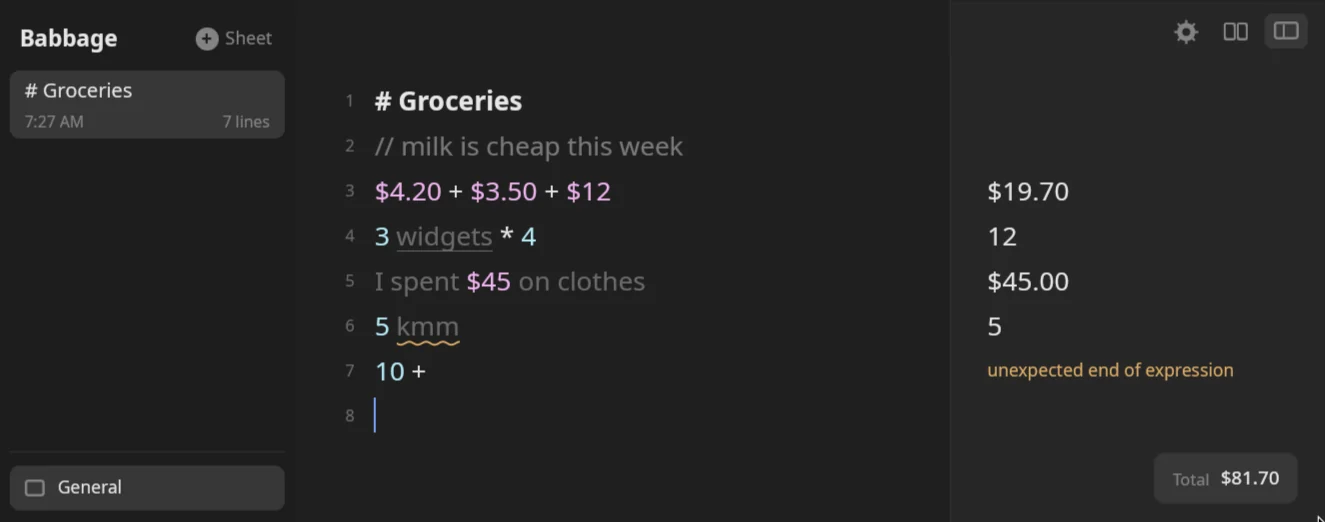
// milk is cheap this week
You can also put a comment at the end of a calculation. Everything after the // is ignored:
2 + 2 // quick check
gives 4. Ctrl+/ comments the selected lines in, or out again if every line with text is already a comment.
With nothing selected it works on the line the caret is in.
Dividers
A line of three dashes, ---, is a divider. It has no answer. By default a divider also ends the variables
defined above it, so each part of a sheet can use its own names. You can turn that off in
Settings.
Blank lines
A blank line has no answer and no meaning. Use as many as you like.
Labels
Put words and a colon in front of a calculation to label it:
Hotel: $180 + $20
Dinner for two: 2 * $35
The first line answers $200.00 and the second $70.00. The label is drawn in bold so you can scan a sheet
for it, and Babbage does not count it as part of the sum.
Prose around a calculation
You can write a line the way you would say it. Babbage finds the numbers and the words that mean something to the calculation, and skips the rest:
lunch was $55 + 25% tip
gives $68.75. The words lunch, was and tip are skipped. 3 widgets * 4 gives 12, and 5 + 3 apples gives
8.
The words Babbage skips
A skipped word is drawn dimmer than the words it used. That is how you can tell at a glance which part of the line counted and which did not. Nothing is hidden: the skipped words stay in the line exactly as you typed them.
The thin underline
When a skipped word comes straight after a number, a value, a unit or a percentage, Babbage cannot be sure you
meant it as plain text, so it draws a thin underline under it. Look at 3 widgets * 4. widgets follows the
number 3, and is underlined. The answer, 12, is still given. The underline is a prompt to check that you meant
it.
A skipped name that stands straight before a bracket, with a space between, is underlined the same way, because it
may be a function that was not understood. price (5) answers 5, with a thin underline under price. A name
with no space before the bracket, such as foo(45), is an error instead.
The wavy underline
When the skipped word comes right after a plain number and is one letter away from a unit, the underline is wavy.
If you typed 5 kmm meaning kilometers, the line answers 5 and kmm has a wavy underline. Hold the pointer over
it and a tip reads "Did you mean km?". The tip is not shown after an amount of money: $45 on stays quiet.
A word that sits among other words is not underlined. In I spent $45 on clothes the whole line is prose around
one amount. It answers $45.00 and nothing is underlined.
Nothing is ever turned into an error just because a word was skipped.
Errors on a line
When Babbage cannot make sense of a line that looks like a calculation, the answer column shows a short message, in a warning color, in place of an answer.
| You type | The answer column says |
|---|---|
10 + |
unexpected end of expression |
4 * (2 + 3 |
unexpected end of expression |
20 / 0 |
division by zero |
An error on one line does not stop the others. Fix the line and its answer returns. A line that depends on one with an error may fail too, until the first one is fixed.
Exact until it cannot be
Babbage does its arithmetic with exact fractions, not with approximations. 1/3 * 3 is exactly 1, and
1/3 + 1/6 is exactly 0.5. There is no building up of tiny errors from one line to the next.
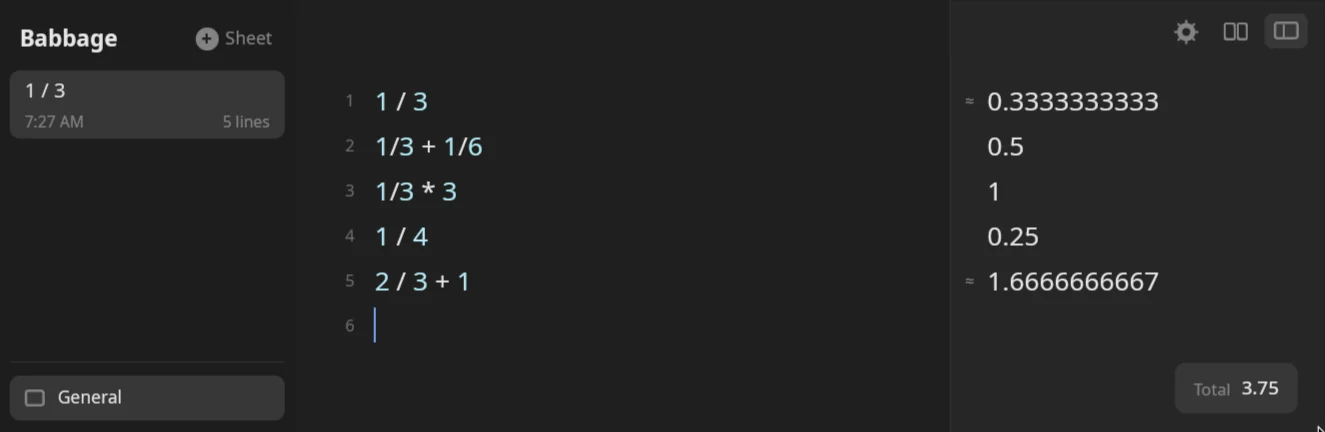
Some answers cannot be written in full. One third has no end in decimal. Babbage shows up to ten decimal places and marks the answer with a small ≈ at the left edge of the answer column:
1 / 3
shows 0.3333333333 with the ≈ beside it. The mark means "close to, not exactly". 2 / 3 + 1 is
1.6666666667 with the mark, while 1 / 4 is 0.25, exactly, and has none.
Roots, logarithms and trigonometry are marked the same way, because their results are not whole fractions. The mark carries on: if a later line uses an approximate answer, its own answer is marked too.
Behind the display, Babbage keeps the full fraction, not the rounded text. When you use 1/3 in a later line,
the later line works from one third, not from 0.3333333333. With 1 / 3 on line 1, the line line1 * 3 answers exactly 1. You can show fewer or more places for any one answer,
or all answers: see Answers and formats.
Copying
- Copy text from the sheet. Select text and press Ctrl+C. Ctrl+X cuts and Ctrl+V pastes. Double-click selects a word, and triple-click selects a line.
- Copy an answer. Click an answer in the answers column to select it, then press Ctrl+C. Or use **Copy Answer in the answer's menu. The text copied is the answer as shown, without the ≈** mark.
- Export a whole sheet. Ctrl+Shift+E writes the sheet with its answers as text, CSV, HTML and PDF. See Sheets and files.
Next: Numbers and percentages.