Give a number a name with =, use the name on any line below, and add up a whole sheet with a floating total or with subtotals you place yourself. Every line sees only the lines above it, so a sheet reads from top to bottom like a running tally.
Name a value
Write a name, =, then anything Babbage can calculate. The answer shows beside the line, and from then on the name stands for it.
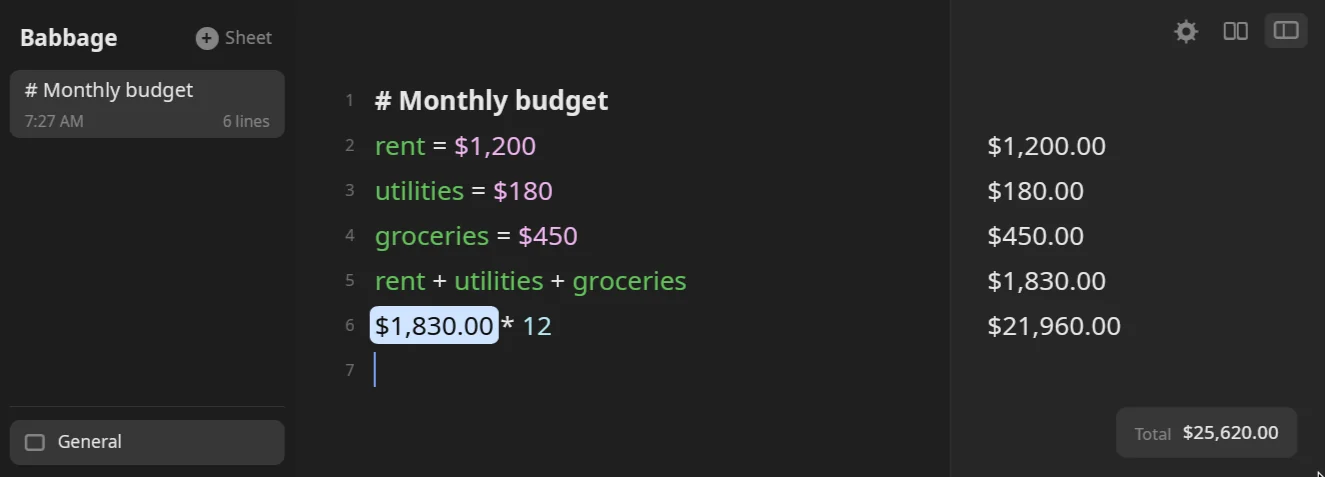
rent = $1,200
utilities = $180
rent + utilities
A name can hold a number, a quantity with a unit, money, a percentage, a date or a length of time:
size = 10 cm
size * 2
size in mm
These give 10 cm, 20 cm and 100 mm.
Rules for names:
- A name starts with a letter and can hold letters, digits, spaces and underscores.
total spent,a long variable nameandcoffee_budgetare all fine. - Case is forgiving.
rentfindsRentwhen only one of them exists. If both exist, the exact spelling wins. - A name must be defined above the line that uses it. A calculation that uses a name nobody has defined is an error rather than a quiet wrong answer, because a typo should never turn into a number.
- A word at the start of a line followed by a colon is a label, not a name:
Groceries: $45does not create a variable calledGroceries. See The basics. - Money keeps every digit in a name even when it shows cents elsewhere:
share = $10/3shows$3.3333333333, andshare * 3gives$10.00.
Change a value
Redefine a name later and the new value applies from that line down. To adjust a value in place, use += or -=:
budget = 500
budget -= 120
budget
The second line answers 380, and so does the third. The name has to have a value already: b += 1 with no earlier b is an error.
Names inside longer lines
A name works anywhere a number would, including in word forms. After side = 5, the line side squared is 25. A name can also be several words long, so my rent works if you defined my rent, and extra spaces between its words do not matter.
A lone x is the times sign when it sits between two values (2 x 3 is 6), and an ordinary name everywhere else. After x = 2, the line x * 3 is 6.
Reuse an earlier line
Every line has a number in the gutter. Type line and a number to use that line's answer: line5 and line 5 mean the same.
$120
$80

line1 + line2
line 4 * 2
The last two answers are $200.00 and $400.00. Blank lines and headings count when you number lines, so read the number off the gutter rather than counting answers.
A reference works only on a line above the one that uses it. line9 on a sheet with five lines is an error that says line 9 has no result above it.
How a reference looks
In the sheet, a reference is drawn as a pale chip holding that line's answer, so line5 * 12 reads as $1,830.00 * 12 while the text underneath stays line5 * 12. The chip updates as the line it points at changes, and the typed text is what is saved.
- The cursor treats a chip as one character: arrow keys step across it.
- Backspace straight after a chip, or Delete straight before one, removes the whole reference.
- A reference to a line with no answer, or to the line itself, stays as typed.
Only line and a number are understood. There is no "previous line" or "above" shorthand: a word like that is read as ordinary text and skipped.
Finish a name with the keyboard
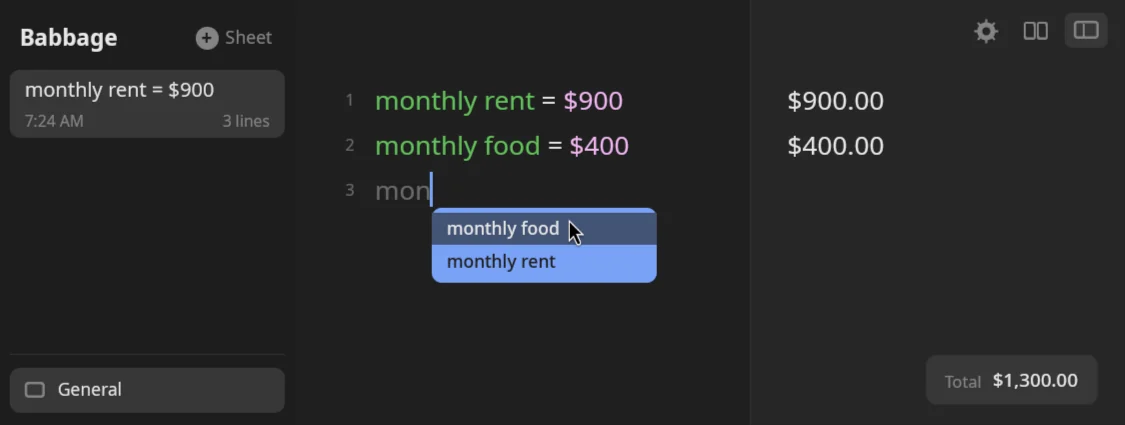
Press Esc while a name is half typed and Babbage completes it from the names defined above. With one match it fills in at once. With several, a small list opens under the cursor: move with Up and Down, and take the highlighted name with Enter, Tab or Esc. Any other key closes the list.
monthly rent = $900
monthly rate = 5%
monthly r
Typing monthly r and pressing Esc opens a list holding monthly rate and monthly rent. Matching ignores case and works on the end of the line: 20 + monthly re completes the last words.
If you would rather use Tab, choose it in Settings, Editing, under "Key that finishes a variable name". The Variables you have defined show in their own color (Settings, Styling, "Variable color").
Renaming
Change the name on the left of an = and Babbage can update the lines below that use the old name. Settings, Editing, "When a variable is renamed" decides whether it asks, always updates them, or never does.
Variables in every sheet
Settings, Variables has a "Global variables" box. Anything written there, separated by ;, exists in every sheet:
rent = $900; tip = 18%
Global variables survive a divider line. See Settings.
Dividers
A line of three or more dashes (---) is a divider. With "Divider lines reset variables" on (the default), a divider ends the scope of the names and tags above it, so a long sheet can hold several independent calculations. Switch it off in Settings, Variables to keep names across dividers.
Totals
There are four ways to add up a sheet. All of them add numbers, money, quantities and lengths of time.
| You want | Use |
|---|---|
| The sum of the whole sheet | The Total chip at the bottom of the window |
| Everything above a line | total alone on a line |
| The sum of a stretch of lines | A subtotal line |
| The sum of tagged lines | total of #tag |
The Total chip
The window shows a Total chip in the bottom right corner. It adds up every line that has an answer, except subtotal and total lines (which would count lines twice). It disappears when the sheet has no answers. The chip shows ≈ before a total that is only approximate, and shows the error in place of a number when the lines cannot be added at all.
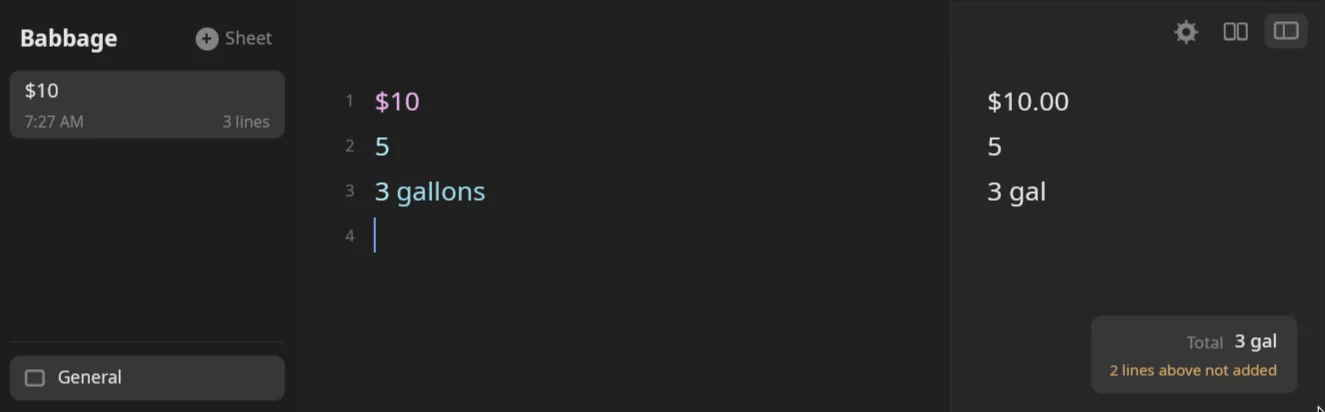
The chip adds the run of lines at the bottom that can be added to each other. If a line cannot be added to the running sum, such as 3 gallons after $10, the sum starts again from that line, and the lines before it are not part of the Total. A note under the Total says how many, for example 2 lines above not added.
The note is how you tell whether the Total covers what you think it does. No note means every line is in the Total. A note on a sheet of one kind of amount, such as a budget, usually means a stray line of another kind restarted the sum, so look for it. On a sheet that mixes kinds on purpose, such as units, dates and prices together, the note is expected.
Plain numbers join whatever unit the sum already has, so $10, 5 and 3 gallons come to 3 gal, with the first two not added.
Percentages are applied to the total at the end, so a 10% line raises the sum by ten percent.
Declaration lines (rent = $900) count in the total like any other line.
Total on a line
Type total (or grand total, or sum) alone on a line. It adds every line above it, whatever subtotals lie between, so a sheet with two subtotals still gets one sum of all its lines:
$10
$20
subtotal
$5
total
The subtotal answers $30.00 and total answers $35.00. The total line is not counted again by the Total chip or by lines below it, and a second total further down does not add the first. With nothing above it, the line is empty and has no answer.
Subtotals
Type subtotal on a line of its own. It answers with the sum of the lines since the last subtotal, heading or divider, and it shows bold under a rule across the answer column.
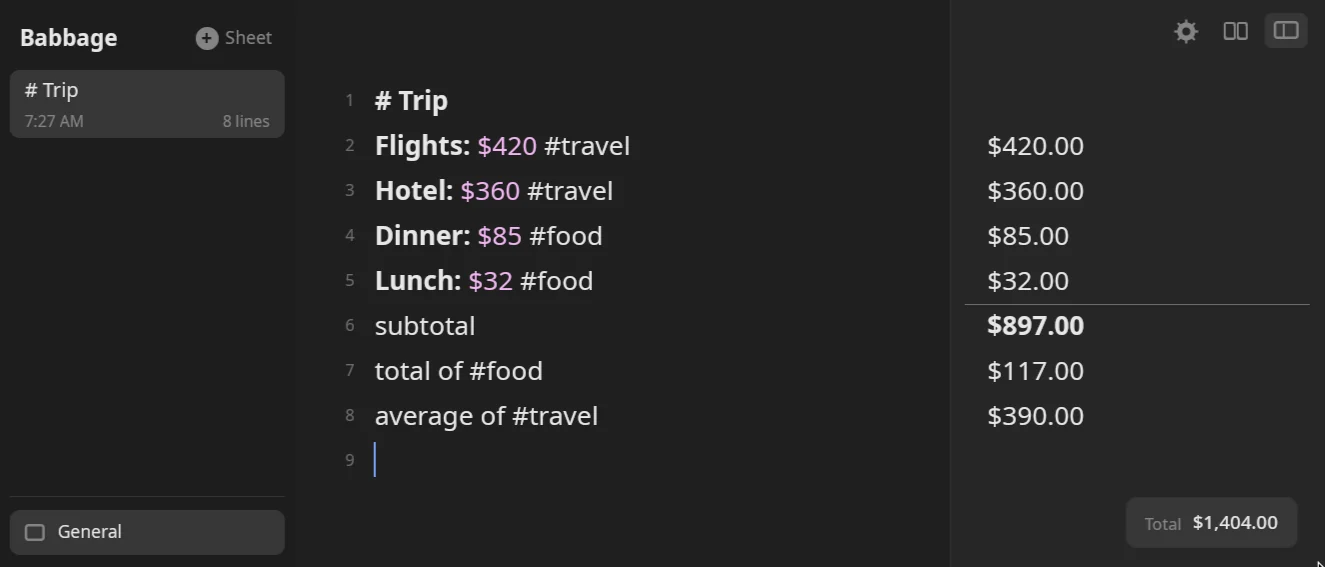
# Trip
Flights: $420 #travel
Hotel: $360 #travel
Dinner: $85 #food
Lunch: $32 #food
subtotal
The subtotal answers $897.00. A percentage line before a subtotal applies to that sum: $100, $50, 10%, then subtotal gives $165.00.
To name a subtotal, write trip total = with nothing after the =. It does the same sum and stores it under that name, so trip total works on later lines. Subtotals never count themselves in the Total chip.
You do not have to type it: open the ⋯ menu on an answer and choose Make Subtotal Line, which adds a subtotal line below (or fills a blank line).
Tags
End a line with #word to tag it, then add up or count just those lines:
| Type | Answers |
|---|---|
total of #food |
The sum of lines tagged #food. |
#food total |
The same. |
sum of #food |
The same. |
average of #food |
The mean of those lines. |
count of #food |
How many there are. |
Tags are not case sensitive, and a tag can include letters, digits, _ and -. A tag looks back only as far as the last divider. On the trip sheet above, total of #food is $117.00 and average of #travel is $390.00. A tag that no line uses gives an error saying there is nothing to add up.
Statistics on a list
For a list written out in one line, use the functions: sum(1, 2, 3) is 6, average(2, 4, 9) is 5, count(5, 6, 7) is 3 and median(1, 9, 3, 4) is 3.5. Word forms work too, such as average of 1, 2 and 3. See Functions and finance.
average, avg, count and median alone on a line show no answer, and the line is left as plain text.
Conditions
A line can depend on a name. if budget > 300 then $20 else $5 answers $20.00 when budget is 380. A line ending in if or unless and a test runs only when the test holds: $50 unless budget > 500 answers $50.00, and $50 if budget > 500 shows no answer. See Functions and finance.