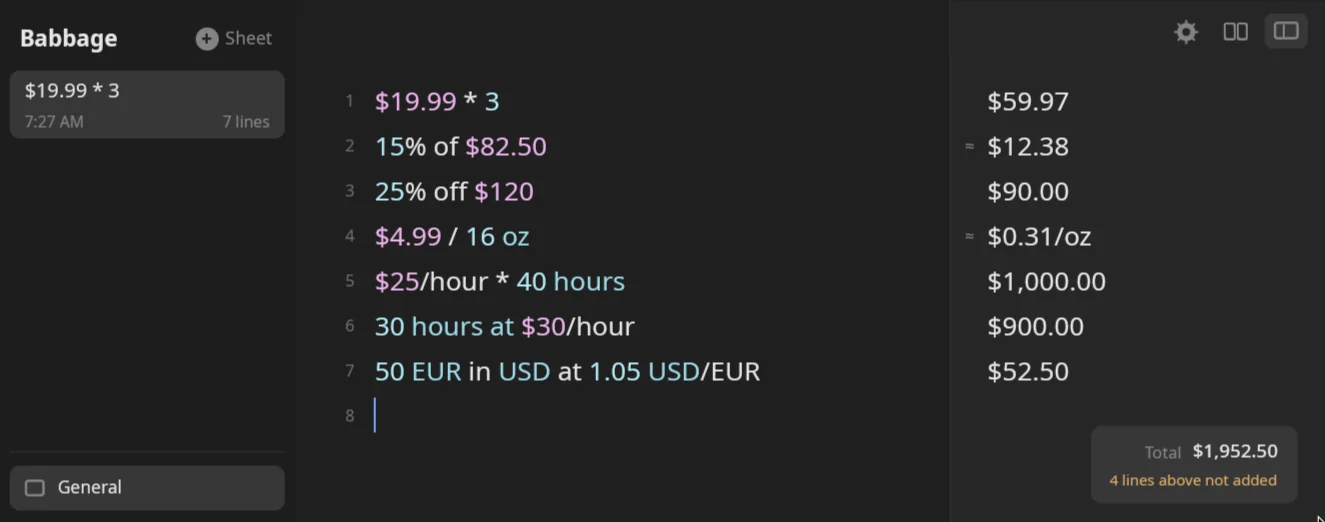
Write an amount with a currency symbol or code and Babbage keeps it as money: it shows the right number of decimals, adds and splits it, works out tips and discounts, and prices things per unit or per hour. Different currencies are never mixed by guesswork. You give the exchange rate on the line, and Babbage uses that and nothing else.
Writing an amount
Put a symbol straight in front of the number, or a currency code after it.
| You type | Answer |
|---|---|
$5 |
$5.00 |
$1,234.5 |
$1,234.50 |
€5 |
€5.00 |
£3.20 |
£3.20 |
¥1000 |
¥1,000 |
₹500 |
₹500.00 |
5 EUR |
€5.00 |
5 GBP |
£5.00 |
5 CHF |
5.00 CHF |
CHF 5 |
5.00 CHF |
1000 JPY |
¥1,000 |
1,000 EUR |
€1,000.00 |
Symbols
These symbols go in front of the number: $ € £ ¥ ₹ ₩ ₽ ₺ ₪ ₫ ฿ ₱ ₴ ₦. The other dollars have their own prefix:
| Prefix | Currency |
|---|---|
US$ |
US dollar |
A$ |
Australian dollar |
C$ |
Canadian dollar |
NZ$ |
New Zealand dollar |
S$ |
Singapore dollar |
HK$ |
Hong Kong dollar |
NT$ |
Taiwan dollar |
R$ |
Brazilian real |
A$10 shows A$10.00, NZ$10 shows NZ$10.00. For the plain $, see Which dollar.
Codes and words
Any three-letter ISO currency code works after a number, in capitals: 5 CAD is C$5.00, 5 AUD is A$5.00, 5 INR is ₹5.00, 5 SEK is 5.00 SEK. A code may also stand in front of the amount: CHF 5 is 5.00 CHF, and EUR 5, GBP 5 and USD 5 work the same way. Codes in lower case, such as 5 eur, are not understood.
A few words work too: 5 dollars, 5 dollar, 5 euros, 5 euro and 5 yen. The word pounds is a weight (5 pounds is 5 lb), so write money in pounds sterling as £5 or 5 GBP.
Currencies show the decimals they really use: two for most, none for JPY and KRW, three for KWD and BHD (1 KWD is 1.000 KWD). A currency without a symbol of its own, such as CHF, is written with its code after the amount.
Crypto and metals
BTC, ETH, SOL, XAU (gold) and XAG (silver), and a few dozen other coins, are currencies that show every digit instead of two: 0.5 BTC is 0.5 BTC. You convert them with a rate like any other currency.
Big and small amounts
Large amounts use the short forms from Numbers and percentages: $1,000,000 shows $1M, and $3 billion shows $3G. You can type them that way too: $45k is $45,000.00 and $1.5M is $1.5M.
Money is shown to the cent but kept exact. $0.1 + $0.2 is $0.30, and $10.005 shows $10.01. An amount too small for cents keeps its digits: $0.0046320835.
Cents and pence
cents and pence are hundredths of a currency, and they join whatever money is on the line:
| You type | Answer |
|---|---|
50 cents |
$0.50 |
50 cents + $1 |
$1.50 |
$1 + 50 cents |
$1.50 |
€1.50 + 50 cents |
€2.00 |
$0.99 + 1 cent |
$1.00 |
$5 - 250 cents |
$2.50 |
100 cents in dollars |
$1.00 |
50 pence |
£0.50 |
50p |
£0.50 |
£2 + 50p |
£2.50 |
50 pence + £1 |
£1.50 |
5 pennies |
£0.05 |
Alone, cents means hundredths of the dollar your sheet uses. penny, pennies and pence always mean pence. 50p is 50 pence too.
Which dollar
A bare $ is one dollar currency, chosen in Settings. Settings → Calculator → What $ means offers USD, AUD, CAD, NZD, SGD and HKD, and USD is the default.
| What $ means | $ stands for |
A US dollar is written |
|---|---|---|
| USD | US dollar | $ or US$ |
| AUD | Australian dollar | US$ |
| CAD | Canadian dollar | US$ |
| NZD | New Zealand dollar | US$ |
| SGD | Singapore dollar | US$ |
| HKD | Hong Kong dollar | US$ |
Whatever the choice, the dollar you chose prints with a plain $, and the other dollars print with their own prefix. With AUD chosen, $5 + A$5 is $10.00, US$5 + US$5 is US$10.00, and $5 + US$5 is an error because they are different currencies. On the default, US$5 + $5 is $10.00 and $5 + A$5 is an error.
Money arithmetic
Money adds, subtracts, and multiplies or divides by plain numbers:
| You type | Answer |
|---|---|
$5 + $3 |
$8.00 |
$5 + 10 |
$15.00 |
$5 - $8 |
-$3.00 |
$19.99 * 3 |
$59.97 |
3 x $19.99 |
$59.97 |
$1.50 * 3 + $2 |
$6.50 |
($1.50 + $2.50) * 3 |
$12.00 |
$100 / 3 |
$33.33 |
$100 / 4 people |
$25.00 |
$10 / $2 |
5 |
A plain number next to money takes the currency, and money divided by money of the same currency is a plain number. Amounts in two currencies cannot be combined: $5 + €3 shows "different currencies need an exchange rate". Skip to Converting currencies for what to do.
Tips
A tip is a percentage added to a bill. Add it directly, or name the bill and the rate and reuse them:
| You type | Answer |
|---|---|
$45 + 18% |
$53.10 |
$45 + 18% tip |
$53.10 |
18% of $45 |
$8.10 |
15% of $82.50 |
$12.38 |
$82.50 + 15% |
$94.88 |
$100 + $20 tip |
$120.00 |
$100 * 1.2 |
$120.00 |
15% tip on $48 |
$55.20 |
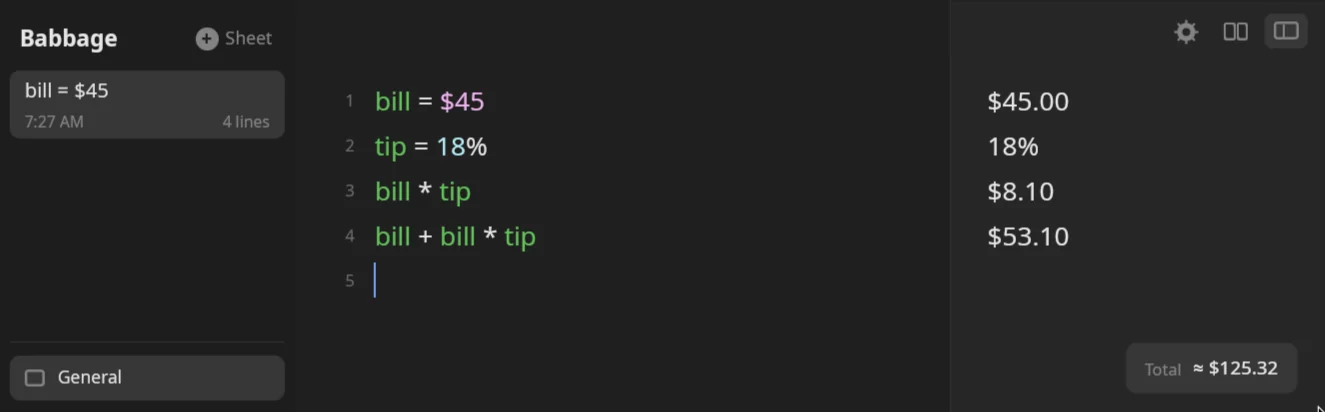
With variables, as in the picture: bill = $45, tip = 18%, then bill * tip is $8.10 and bill + bill * tip is $53.10. The word tip in $45 + 18% tip is skipped, as is any other prose word. See Variables and totals, including global variables that are there in every sheet.
Tips are exact before they are shown: 15% of $82.50 is really $12.375, shown as $12.38.
Tax
For a sales tax rate you use often, name it in Settings. Settings → Calculator → Sales tax takes a name made of letters and a rate: VAT 15%, or GST 10, or Sales 8.25%. The rate must be from 0 to 100. Then the name works in a line. With VAT 15%:
| You type | Answer | What it is |
|---|---|---|
$300 + VAT |
$345.00 |
the price with tax added |
VAT on $300 |
$45.00 |
the tax that gets added |
$300 - VAT |
$260.87 |
the price with tax taken out |
VAT off $300 |
$260.87 |
the same |
VAT in $300 |
$39.13 |
the tax contained in $300 |
VAT of $300 |
$39.13 |
the same |
$300 - VAT and VAT off $300 assume the $300 includes the tax, so they divide by 1.15 and do not just take 15% off. $115 - VAT is $100.00.
Without a tax set, the name is not known and the line is an error. A tax rate you only need once can be written as an ordinary percentage: $50 + 8.25% is $54.13, and 8.25% of $50 is $4.13.
Discounts
A percentage after a minus takes it off, or write the percentage first with off:
| You type | Answer |
|---|---|
$120 - 25% |
$90.00 |
25% off $120 |
$90.00 |
20% off $80 |
$64.00 |
30% discount on $200 |
$140.00 |
$100 - 20% - 10% |
$72.00 |
$100 * (1 - 20%) |
$80.00 |
$100 * 80% |
$80.00 |
$100 - $20 |
$80.00 |
sale = 25% off $80 |
$60.00 |
Two discounts one after another apply in order: 20% off, then 10% off the new price. To find the percentage between two prices, use the plain numbers with the forms in Numbers and percentages: 80 to 60 as % is -25%.
Price per unit
Divide a price by an amount to get a price per unit, or multiply a price per unit by a quantity:
| You type | Answer |
|---|---|
$4.99 / 16 oz |
$0.31/oz |
$4.99 / 16 oz in $/lb |
$4.99/lb |
$6 per 12 eggs |
$0.50 |
$3.50 per lb |
$3.50/lb |
$3.50/lb * 2 lb |
$7.00 |
$2/kg * 500 g |
$1.00 |
$3.50/lb in $/kg |
$7.72/kg |
$4/gal in $/L |
$1.06/L |
$0.15/kWh * 500 kWh |
$75.00 |
€2.50/L * 40 L |
€100.00 |
The quantity can be in a different unit from the price: $2/kg * 500 g converts the grams for you. Convert the price itself with in $/lb or in $/kg. The unit rules are in Units and conversions.
Pay and rates
A rate is money per unit of time. Write it with a slash, per, a or an:
| You type | Answer |
|---|---|
$25 an hour |
$25.00/hour |
$24 a day |
$24.00/day |
$99 per week |
$99.00/week |
$60,000 per year |
$60,000.00/year |
Earnings
Multiply a rate by the time, or use at:
| You type | Answer |
|---|---|
$25/hour * 40 hours |
$1,000.00 |
$25 an hour * 3 hours |
$75.00 |
$12.50 per hour * 7.5 hours |
$93.75 |
$24/day * 30 days |
$720.00 |
30 hours at $30/hour |
$900.00 |
$25/hour * 40 hours/week * 52 weeks |
$52,000.00 |
$18/hour * 37.5 hours/week |
$675.00/week |
$18/hour * 37.5 hours/week * 4 weeks |
$2,700.00 |
$9.99/month * 12 months |
$119.88 |
The time can come first, too: 40 hours * $25 / hour is $1,000.00, the same as $25/hour * 40 hours.
at also goes the other way: $500 at $20/hour is 25 hours, the time that money buys.
From one period to another
Change the period with in:
| You type | Answer |
|---|---|
$60,000/year in $/month |
$5,000.00/month |
$25/hour in $/day |
$600.00/day |
$9.99/month in $/year |
$119.88/year |
$1,000 per week in $/year |
$52,177.50/year |
$500/month / 30 days |
$16.67/day |
These use calendar time: in $/hour spreads a year over every hour in it, so $60,000/year in $/hour is $6.84/hour, not a pay rate for a working week. For work time, use workday.
Workdays
A workday is the length in the work-hours setting, 8 hours unless you change it. Hours, weeks and years convert at that rate, and a week is five workdays:
| You type | Answer |
|---|---|
$15/hour * 1 workday |
$120.00 |
$500/workday * 10 days |
$3,571.43 |
$60,000/year in $/workday |
$229.98/workday |
$500/workday * 10 days counts ten calendar days at their average share of working days (about 7.14). To count real working days, say so with 10 workdays, or use the work-days forms in Dates and times.
Converting currencies
Babbage does not look up exchange rates, so it never invents one. You give the rate in the line with at (or @), written as the amount of the new currency per unit of the old one:
| You type | Answer |
|---|---|
50 EUR in USD at 1.05 USD/EUR |
$52.50 |
50 EUR to USD at 1.05 USD/EUR |
$52.50 |
50 EUR in USD @ 1.05 USD/EUR |
$52.50 |
$50 in EUR at 0.9 EUR/USD |
€45.00 |
$100 in GBP at 0.79 GBP/USD |
£79.00 |
100 USD in JPY at 150 JPY/USD |
¥15,000 |
50 AUD in USD at 0.66 USD/AUD |
$33.00 |
0.5 BTC in USD at 60000 USD/BTC |
$30,000.00 |
The rate must name both currencies. $50 in EUR at 0.9 alone is refused, and so is $10 in EUR with no rate.
To use one rate on several lines, put it in a variable:
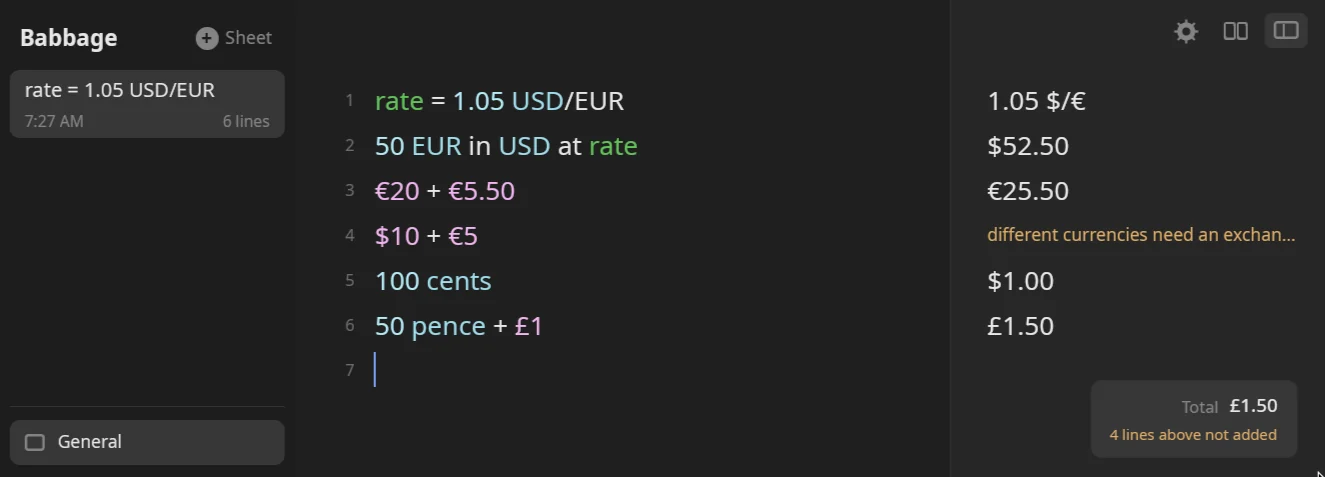
rate = 1.05 USD/EUR shows as 1.05 $/€, and then 50 EUR in USD at rate is $52.50. A line that adds two currencies, such as $10 + €5, is an error until you convert one of them first, in brackets: $10 + (5 EUR in USD at rate) is $15.25.
How money is shown
Three switches change how money looks. All are in Settings → Calculator:
- Currency codes, not symbols shows
5.00 EURand not€5.00. - Hide trailing zeros on money shows
$5and not$5.00. - What $ means, covered above.
On any single answer, the ⋯ menu has a $ switch for fixed money digits. See Answers and formats.