A task manager for Omarchy
Fairfax
A fast, easy-to-use task manager, at home on any desktop, including Linux.
Fairfax is a keyboard-first task manager supporting smart lists and tags, focus lists that pull tasks from everywhere, start dates that hide work until it's time, projects and checklists, and a single key for everything you do to a task. It follows the Omarchy theme live, keeps everything in a local database, and syncs between machines through a git repository. It's named after Mrs Fairfax, Thornfield's housekeeper in Jane Eyre, who kept everything in order.
Fairfax 1.0.4 Abandon a task as "won't do", a calmer My Day header, and menus that scroll in short windowsInstalled in one line
The installer downloads the latest release and checks every file
against its published checksum. On Arch and Omarchy it installs the
pacman package; anywhere else it puts the AppImage under
~/.local, no root needed. On Omarchy it also adds a
Quick Entry key, menu entries and a background start, so alarms
arrive and Quick Entry opens instantly.
$ curl -fsSL https://github.com/jrimmer/fairfax/releases/latest/download/install.sh | bash

# then, from anywhere
$ frfx Call Sam tomorrow 3pm #family !!   # add a task
$ frfx                                    # today, numbered
$ frfx done 3                             # complete one
Debian, Ubuntu, Fedora and plain tarball builds are on every release page too.
The main screen
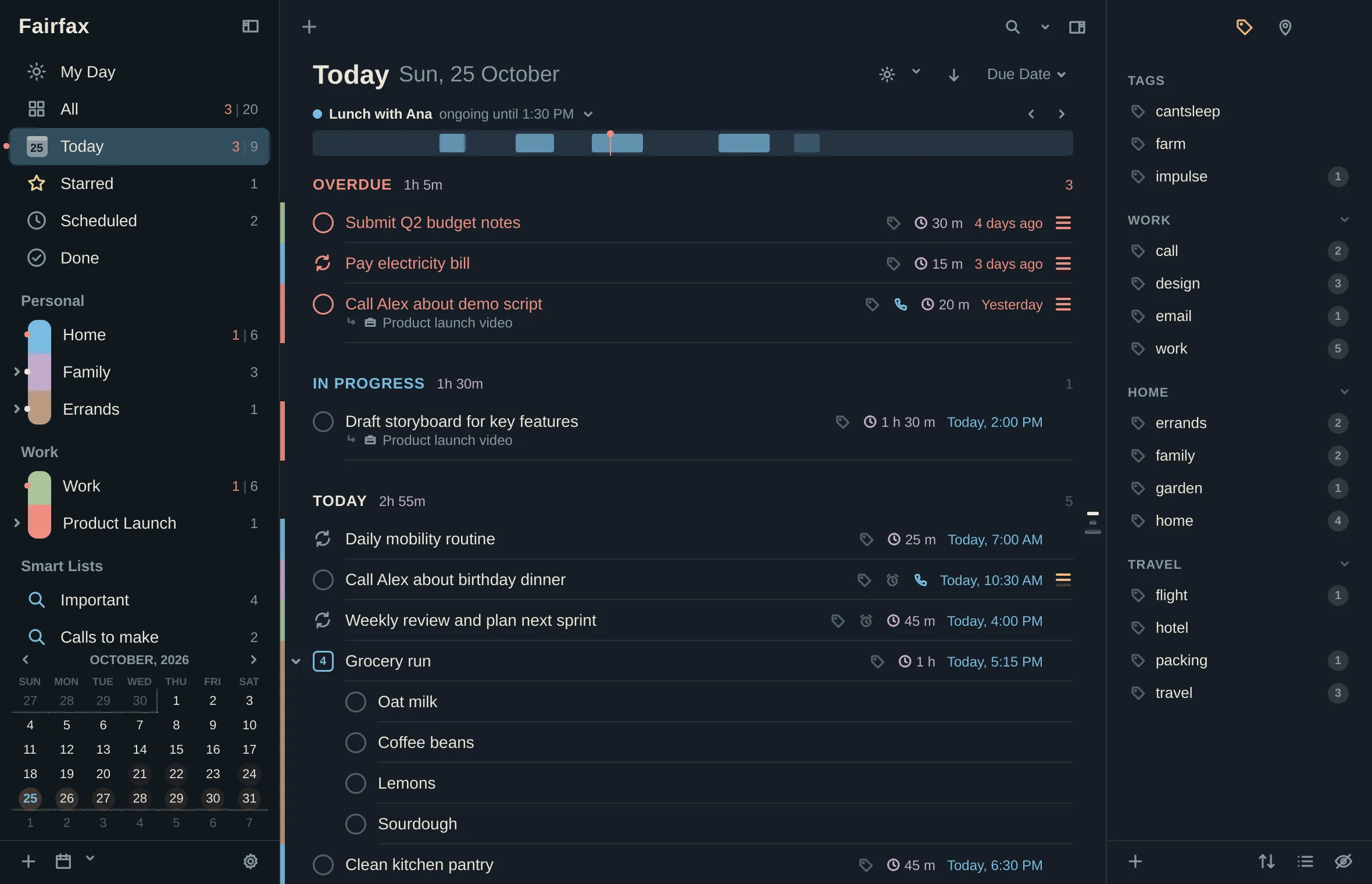
Lists and focus lists on the left, with a month calendar; the tasks in the middle, grouped and timed, under a strip showing the day's calendar events; tags and places on the right. Overdue work is marked, durations add up per section, and checklists open in place.
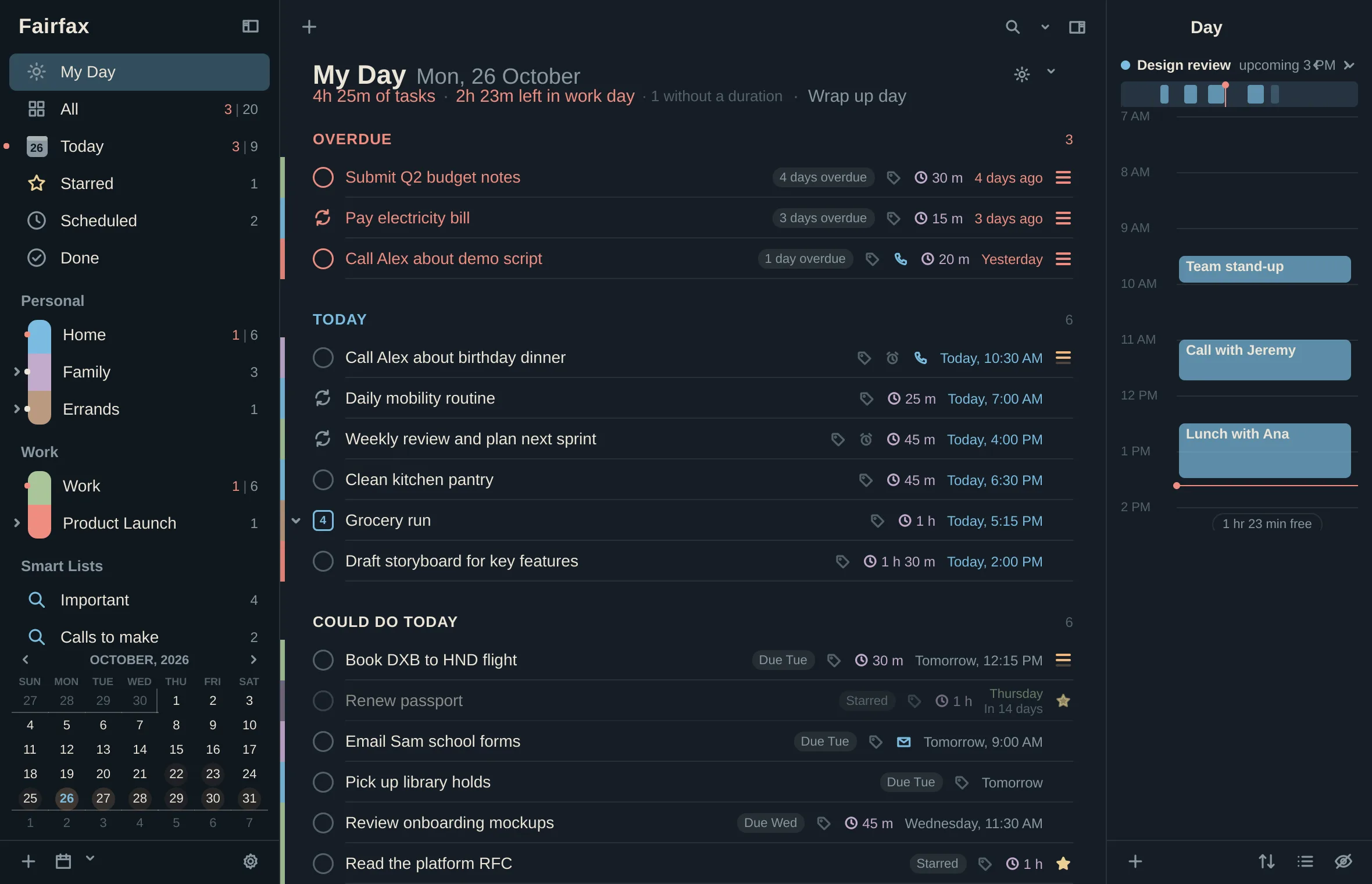
Plan your day
My Day gathers what's overdue, what's on for today and what you could pick up if there's room, with the day's calendar beside it. The header adds up the tasks against the time left in your work day, and when the day ends, Wrap up day shows what got done and lets you move the rest to tomorrow in a keystroke.
Capture from anywhere
Quick Entry opens over whatever you're doing. Type the task the way you'd say it and Fairfax picks out the date, time, tags, priority and list as you type, then shows what the task will get before you save.

On Omarchy, Super+Shift+T opens Quick Entry over
whatever you're doing, and Fairfax waits in the background so it
appears instantly and alarms still arrive.
What you get
-
New in 1.0
Fast, and tested to stay fast
Opening a list of 80 tasks used to take a few seconds on a tall screen; it now takes about a fifth of a second, and Today and search are as quick. Each task row now builds its right-click menu only when you open it, and sorting works out dates once instead of on every comparison. A performance suite runs with every test pass and fails if switching lists, searching, opening the editor or completing a task gets slower.
-
Focus lists and start dates
All, Today, Starred, Scheduled and Done gather tasks from every list. A future start date hides a task until its day, and a duration with a due time brings it forward in time to do it.
-
My Day
A daily plan built from the dates tasks already have: what's overdue, what's on for today, and what you could do today, each with the reason it's there. The header shows how much is planned against the time left in your work day, and Wrap up day closes the day out.
-
Projects, checklists and sections
A project's tasks keep their own dates and show up in the focus lists on their own; a checklist's items ride along with it. Headings split a long list, and tasks drag between them.
-
Smart Lists
Search with a compact query syntax, or build a search a rule at a time (priority is high, tag is not set, due this week), and save it as a list that stays up to date.
-
Tags and places
Group tags, filter by them from the right panel, and pause one to hide every task that carries it until you resume it.
-
Repeats and alarms
Repeat by day, week, month or year, from the due date or from completion, with an end rule. Alarms arrive as desktop notifications, even with the window closed.
-
Mail to Fairfax
Mail becomes tasks from a mailbox you own, converted as it arrives: the subject is the title, the body the notes, and the same message never makes a second task. Gmail works with an app password, and nothing passes through anyone else's server.
-
Moving in
Import from TickTick, Things 3, OmniFocus or any iCalendar export. Every import takes a backup first and undoes in one step.
-
Keyboard and screen readers
Single keys for every task command, Quick Open to jump to any task or list, and shortcuts you can remap. Every control has a name and a role, so Orca reads the list, the counts and the editor as you move.
Working with scripts and agents
Everything you can do to a task in the window, a program can do too. Changes appear in the open window within a couple of seconds.
-
An MCP server
Same machinefairfax mcpoffers every command as a tool to any agent that speaks the Model Context Protocol: find, create, edit, move, complete and delete tasks, manage alarms and tags. -
JSON commands
Same machinefairfax ctlruns the same commands from a script, taking and printing JSON, andfairfax://links work from anywhere that opens a URL. -
The git repository
Sync stores each task as a small JSON file. A program on another machine can clone the repository, change files and push, and Fairfax merges the change field by field, so its edits and yours both survive, and keeps its own data in an
Anywhereextobject. The format is documented.
$ fairfax ctl query_tasks focus=today
$ fairfax ctl create_task '{"title": "Call Sam tomorrow 3pm", "natural_language": true}'
$ fairfax ctl complete_task '{"task_ids": ["347"]}'
Fairfax can also ask a model of your choosing to suggest changes, which wait in a review sheet until you accept them. It's off by default, and points at a model on your own machine when you turn it on.
Sync, on your terms
There's no Fairfax server. Machines stay in step through storage you already have, and any of these can run at once:
-
A git repository
The main way. One file per task, merged record by record so a sync never stops on a conflict, with every change in the history.
-
A folder or WebDAV
The same files in a Syncthing, Dropbox or Nextcloud folder, or on a WebDAV server.
-
CalDAV
Tasks as VTODOs on Nextcloud, Fastmail and other calendar servers, leaving other apps' data on each task untouched.
-
Todoist
A bridge to Todoist, for a phone in your pocket.
Backups are automatic, and you can restore all of one or only the lists you choose.
Read more
- User guide Thirteen chapters with screenshots, from your first task to every setting
- Sync format Every record and field, for programs that read or write tasks
- Packages and releases What each release contains, and building it yourself